
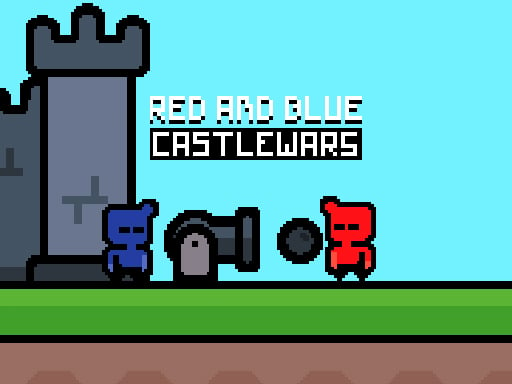
About This Game
Red and Blue Castlewars is a ACTION game that runs right in your browser. No need to download anything or have a powerful computer — just open and play.
Are you ready to battle your friend? Throw cannonballs at your buddy and destroy their castle. Are you up for the red versus blue cannonball fight? Load up the cannon and fire away. Purchase a cannonball and launch it. The first castle to crumble wins. Battle your friend and emerge victorious.
Red and Blue Castlewars doesn't ask for your money or your hard drive space. What you see is what you get — pure gameplay. Easy to start, tough to walk away from. Players from all over jump in, share their tricks, and keep things lively.
Every time you play Red and Blue Castlewars, it's a little different. The situations change, the choices you make actually matter, and no two sessions feel the same. The more rounds you run, the more you'll pick up. Plus it loads fast, runs smooth, and works just fine even on older or cheaper devices.
How To Play
You can play on anything — laptop, phone, tablet, whatever. Use a mouse on desktop, or just tap and swipe on touchscreens. Give it a minute and it'll feel completely natural.
Quick Start Guide
To start playing
Red and Blue Castlewars , just hit the play button up above. That's it — no sign-up, no install.
The game
works on any modern browser and will automatically fit your screen size.
Controls:
- Mouse / Touch: Click or tap anywhere to interact with the game.
- Keyboard: Use arrow keys, spacebar, or WASD if the game supports it.
- Mobile: Swipe, tap, or hold on the screen to play.
Tips to get better:
You don't have to figure everything out in the first five minutes. Take your time, try things out,
and see what
works. The game gives you visual and sound feedback — pay attention to that and you'll catch on
fast. Above all,
just have fun with it.
Something not working?
Make sure JavaScript is turned on and your browser supports HTML5. On mobile, a Wi-Fi connection
works best. If
something looks weird, try refreshing the page — that usually does the trick.
Related games

Ultimate Hoops Showdown: Basketball Arena
Excavator Driving Challenge

Soccer Hero

Shaolin Soccer
Squid Game 3D Online

Hurry Ambulance
Highway Police Race

Rally Championship 2
Skater Boy
Wormo.io
Slap Master 3D
Square Hero Bird

My Pou Virtual Pet
Super Stickman Hook

Funny Fever Hospital

Celebrity First Date Adventure

Vampiric Roulette Romance
Merge Master: Skibidi Bop

Dark War
Driver Zombie Escape 2D

Mr BounceMaster
Flag War

Flappy Helicopter 2 Player

Head Soccer 2D 2023